> This site is not endorsed by or affiliated with Electronic Arts, or its licensors. Trademarks are the property of their respective owners. Game content and materials copyright Electronic Arts Inc. and its licensors. All Rights Reserved.
>
> RA3 Mod XML is an unofficial fan-made tool. It requires a separately installed RA3 Mod SDK.
[**English**](README.md) | [中文](README.zh-CN.md)
# RA3 Mod XML
A VS Code extension that brings **IntelliSense, navigation, reference tracking, and diagnostics** to XML-based mods for **Command & Conquer: Red Alert 3**.
It understands the RA3 Mod SDK's XML schema, asset types, references, includes, and vanilla game data — so editing a large mod feels much more like working with a real programming language.
Intelligent Completion
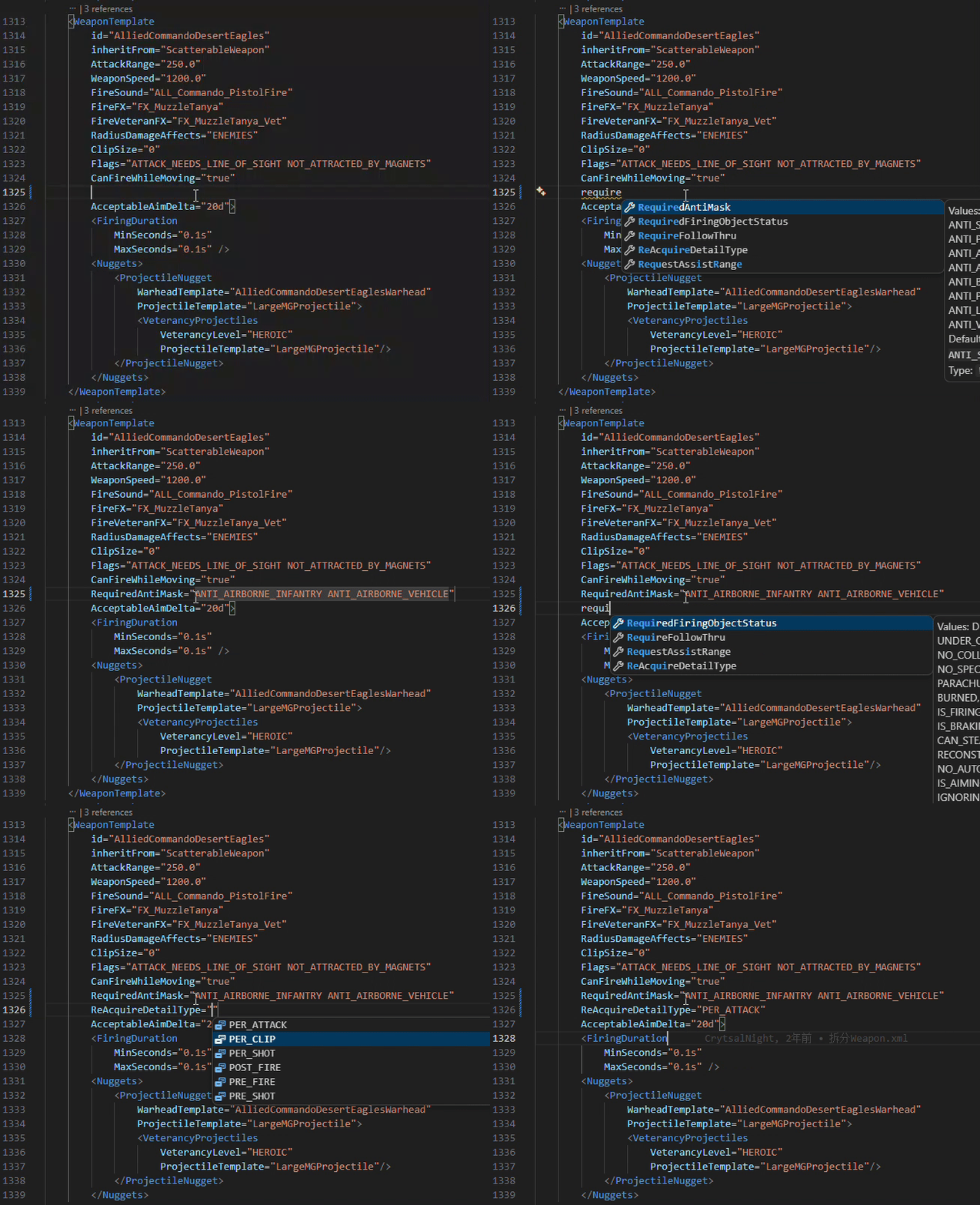
|
Go to Definition
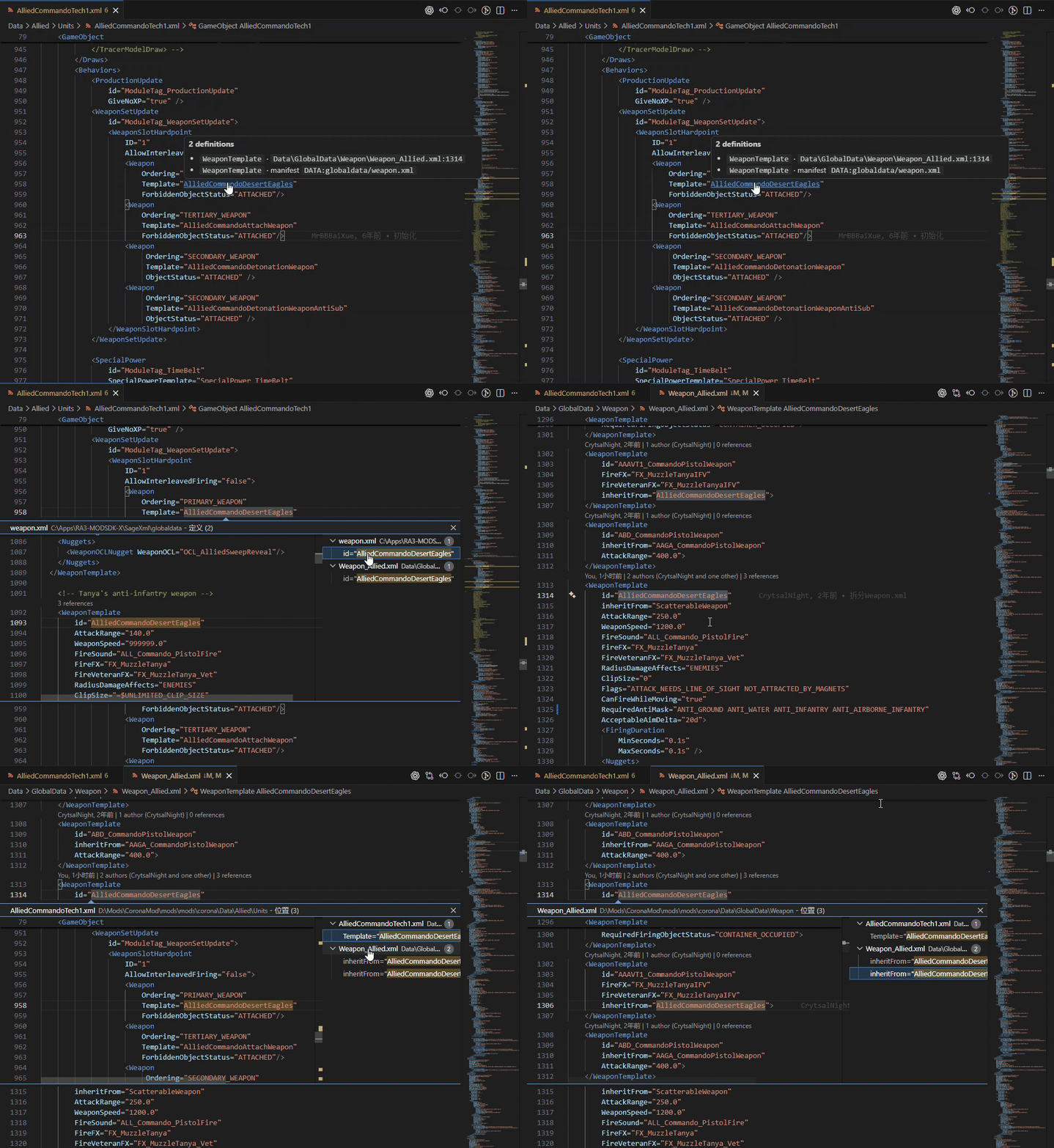
|
Reference-aware completion
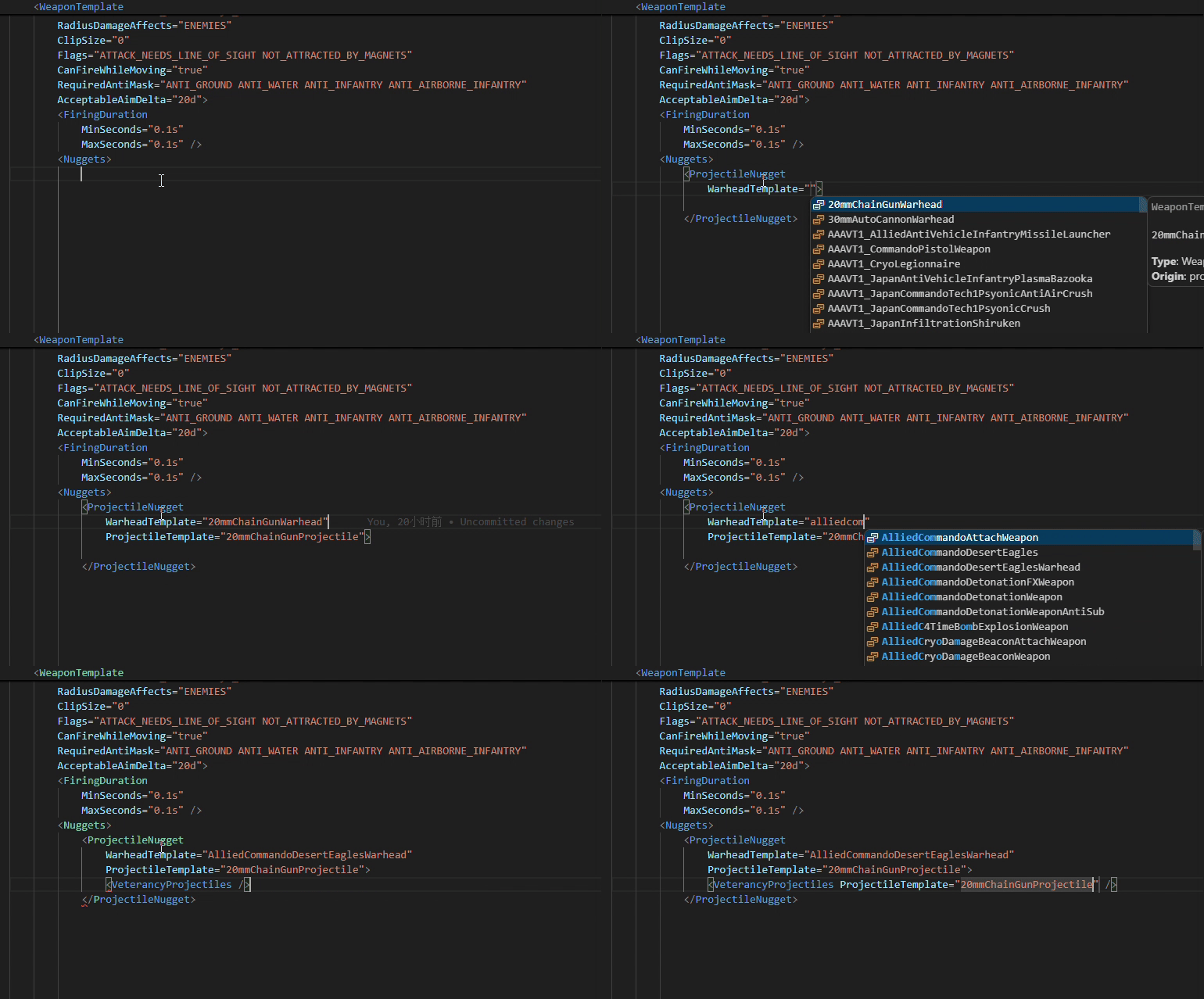
## Features
### Intelligent Completion
Get context-aware completion based on the RA3 XML schema and project data.
* Elements and attributes based on the RA3 XSD
* Required attributes, types, documentation, and default values
* Asset references such as `Weapon`, `CommandSet`, and `inheritFrom`
* Enum values and flag lists such as `KindOf` and `Surfaces`
* Asset IDs in text-content elements such as `` and ``
* `DATA:`, `ART:`, and `AUDIO:` paths
* Automatic continuation when editing flag lists
Reference completion is type-aware, so an asset ID is only suggested where its asset type is valid.
### Syntax Highlighting
RA3-specific constructs are highlighted on top of the built-in XML grammar.
### Navigation & References
Navigate through a mod's asset graph directly from the editor.
* **Go to Definition** (Ctrl+Click) for asset references
* **Find All References** using semantic reference information
* **Reference CodeLens** showing how many times an asset is referenced
* Hover information for elements, attributes, references, and `$DEFINE`s
* Ctrl+Click navigation for `Include` and `xi:include`
* Document outline for top-level assets and `$DEFINE`s
### Diagnostics
Catch common modding mistakes while you edit.
* XML syntax errors
* Unknown elements and attributes
* Missing or duplicate asset IDs
* Unresolved asset references
* References to the wrong asset type
* Undefined `$DEFINE`s
### Project Analysis
The extension can analyze the entire workspace rather than only the file currently open.
**Find unreferenced assets** lists project assets that are not referenced anywhere in the workspace, helping identify obsolete or accidentally unused definitions.
Run:
`RA3 Mod XML: Find unreferenced assets…`
You can also use the editor context menu to find unreferenced assets of the current asset type.
### Vanilla SDK Integration
The extension can use asset definitions from the **RA3 Mod SDK**, allowing vanilla game assets to participate in completion, hover information, navigation, and diagnostics.
`` manifests such as `static.manifest`, `global.manifest`, and `audio.manifest` (from the SDK's `builtmods` directory) are supported when the corresponding SDK data is available.
### Large Mod Support
Workspace indexing runs in the background and uses persistent caches to avoid rebuilding everything on every VS Code launch.
The extension has been tested on Corona Mod, a large size RA3 mod:
- 32000+ assets
- 8000+ XML files
- 3000+ W3X files
- **Full index:** ~3 minutes
- **Cached startup:** ~40 seconds to validate cached data and rebuild the in-memory index
Measurements were taken on a mechanical hard drive. Actual performance depends on hardware and project structure.
## Getting Started
1. Install the extension from the VS Code Marketplace.
2. Open your RA3 Mod project folder in VS Code.
3. Make sure the workspace contains `Data/Mod.xml`, `Data/additionalmaps/mapmetadata_*.xml`, or a `*.babproj` file.
4. Set the RA3 Mod SDK path if necessary — the extension can auto-detect an
installed SDK from the Windows registry, or you can pick the folder
manually. Leaving it empty runs the extension in project-only mode.
5. Open any `*.xml` file and start editing.
The extension automatically detects RA3 Mod workspaces and starts indexing in
the background. When the SDK is missing it shows a status-bar hint and offers
to configure the path (once per session).
## Configuration
| Setting | Default | Description |
| -------------------------------------- | ---------------------- | ------------------------------------------------------------------------------- |
| `ra3modxml.sdkPath` | *(empty)* | Path to the RA3 Mod SDK; empty disables vanilla SDK features (project-only mode) |
| `ra3modxml.indexSageXml` | `true` | Index vanilla XML definitions from the SDK's `SageXml` directory |
| `ra3modxml.reportUnresolvedReferences` | `warning` | Diagnostic level for unresolved references: `warning`, `information`, or `none` |
| `ra3modxml.diagnoseUnknownElements` | `true` | Report unknown XML elements and attributes |
| `ra3modxml.definitionMode` | `all` | Choose between project and vanilla definitions when navigating to references |
| `ra3modxml.additionalDataSearchPaths` | `[]` | Additional directories searched for `DATA:` paths |
If the SDK is installed, the extension detects it from the registry and offers
it with one click; otherwise you can set `ra3modxml.sdkPath` manually or use
the `RA3 Mod XML: Configure SDK path…` command.
## Commands
* `RA3 Mod XML: Re-index workspace`
* `RA3 Mod XML: Show index report`
* `RA3 Mod XML: Clear caches and rebuild`
* `RA3 Mod XML: Configure SDK path…`
* `RA3 Mod XML: Show cache report`
* `RA3 Mod XML: Find unreferenced assets…`
* `RA3 Mod XML: Find unreferenced assets of this type`
## Requirements
* Visual Studio Code
* A Red Alert 3 Mod SDK installation for full schema and vanilla asset support
* A RA3 Mod project containing `Data/Mod.xml`, `Data/additionalmaps/mapmetadata_*.xml`, or a `*.babproj` file
## Development
```powershell
npm install
npm run generate-model # Generate the runtime schema model from the SDK XSD
npm test # Run unit tests
npm run build # Build the extension
npm run package # Create a .vsix package
```
Test fixtures are located in `test/fixtures/minimod` and cover scenarios including includes, duplicate IDs, same-name/different-type IDs, and manifest fallback.
## Architecture
The extension is organized around a VS Code-independent parsing and indexing core:
```text
src/
extension.ts
projectRoot.ts
workspace.ts
settings.ts
language/
xmlParser.ts
context.ts
typeContext.ts
semanticTokens.ts
model/
schemaModel.ts
schema-model.json # Generated XSD model, bundled with the extension
asset-types.json # Generated AssetType hash table, bundled with the extension
indexer/
includeResolver.ts
existence.ts
manifestParser.ts
fileScanner.ts
refs.ts
referenceIndex.ts
xpointer.ts
logicalTree.ts
localScope.ts
shallowScan.ts
records.ts
caches.ts
diskCache.ts
indexer.ts
types.ts
features/
completion.ts
hover.ts
navigation.ts
references.ts
codeLens.ts
unreferenced.ts
diagnostics.ts
semanticTokens.ts
syntaxes/
ra3modxml.tmLanguage.json # Injected domain grammar (keeps the built-in XML grammar)
tools/
xsd-to-model.mjs # Generates schema-model.json from the SDK XSD
extract-asset-types.mjs # Extracts AssetType hashes from OpenSAGE
```
## References
* OpenSAGE `ManifestFile.cs` — manifest format reference