
This site is not endorsed by or affiliated with Electronic Arts, or its licensors. Trademarks are the property of their respective owners. Game content and materials copyright Electronic Arts Inc. and its licensors. All Rights Reserved.
RA3 Mod XML is an unofficial player-made tool. It requires a separately installed RA3 Mod SDK.
RA3 Mod XML
AI-generated project
This extension was generated almost entirely by AI. As a result, there may be unexpected bugs or edge cases. Bug reports, corrections, and feedback are very welcome.
A VS Code extension that brings IntelliSense, navigation, reference tracking, and diagnostics to XML-based mods for Command & Conquer: Red Alert 3.
It understands the RA3 Mod SDK's XML schema, asset types, references, includes, and vanilla game data — so editing a large mod feels much more like working with a real programming language.
Source code: GitHub mirror · Gitea
Intelligent Completion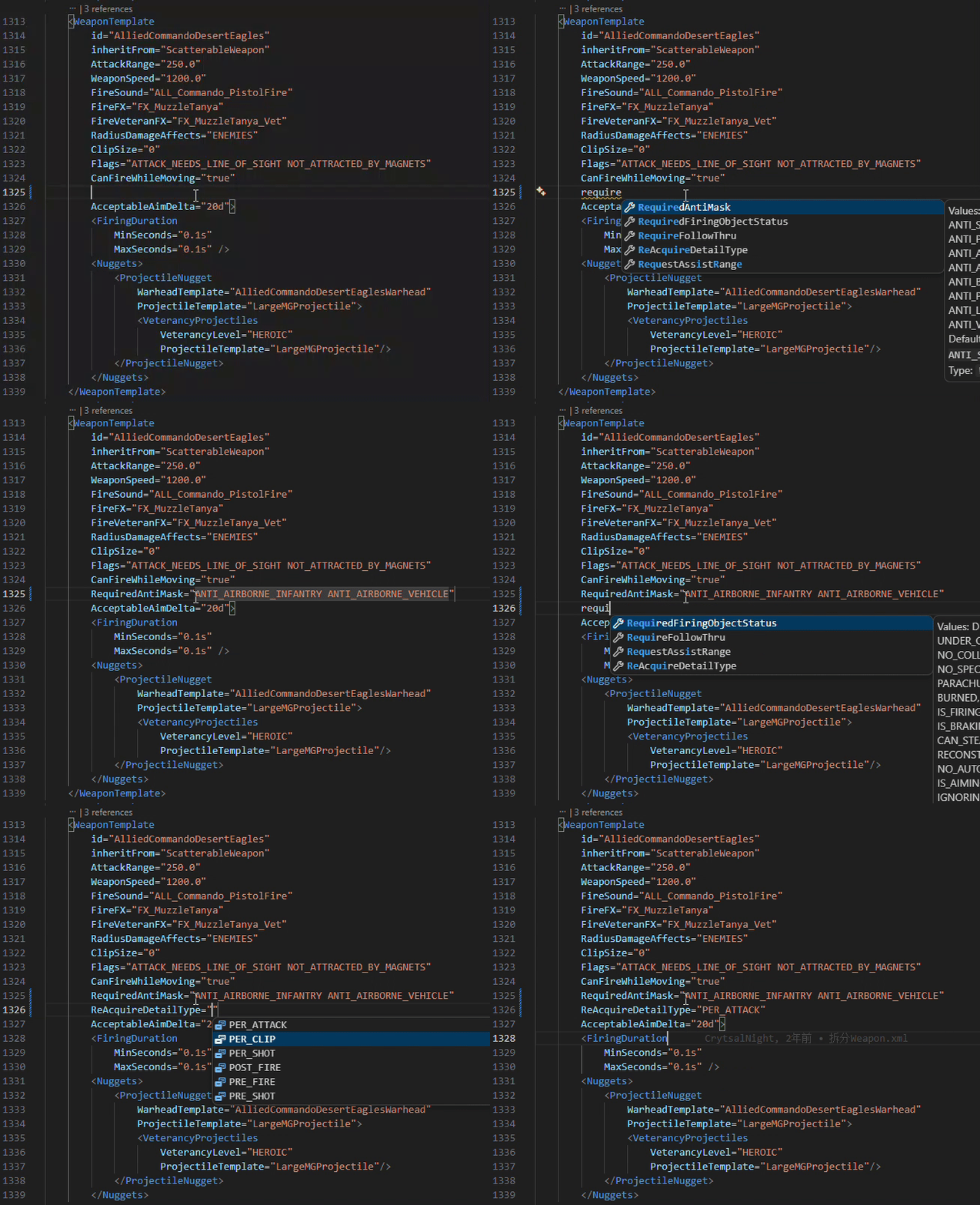
|
Go to Definition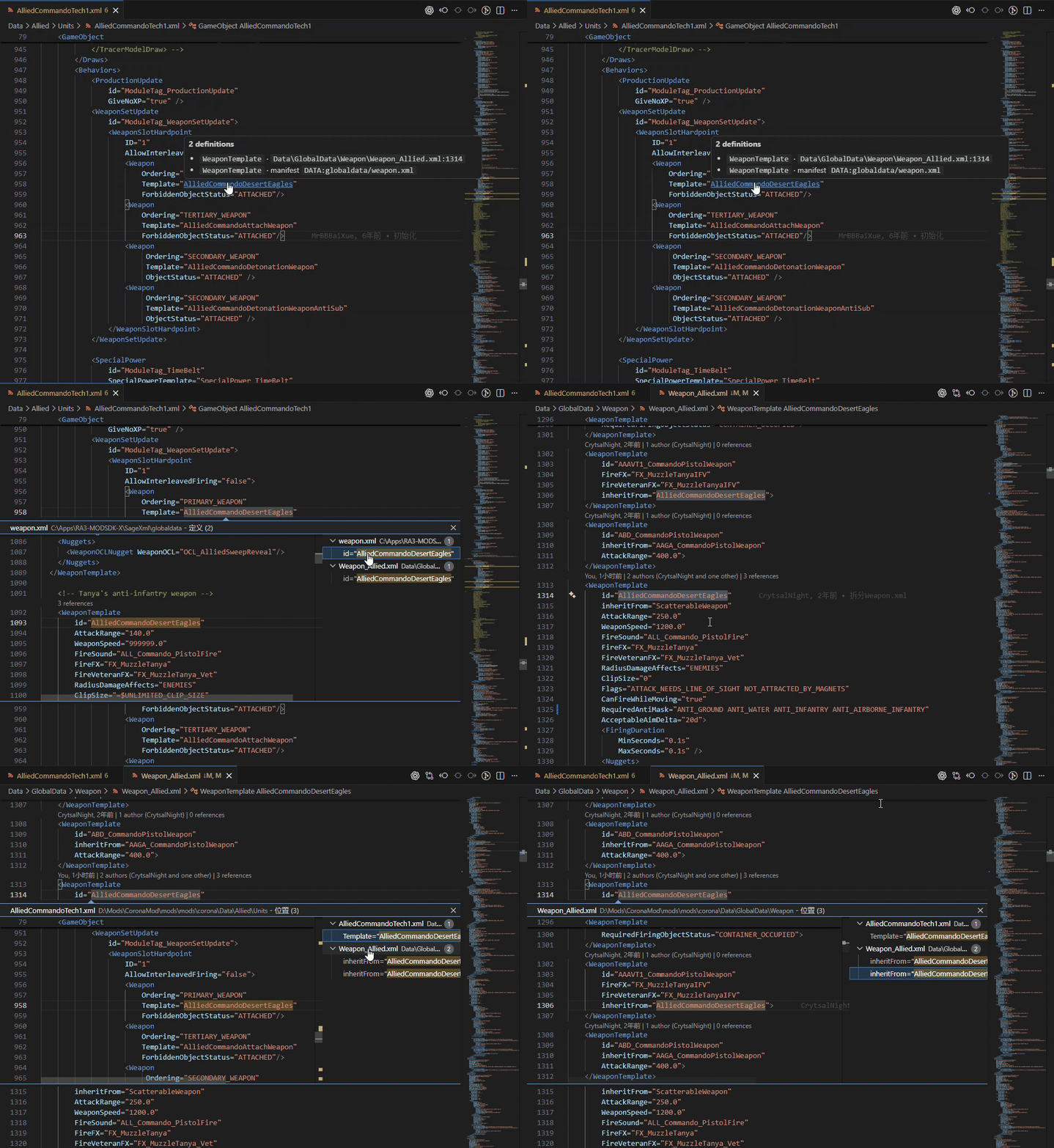
|
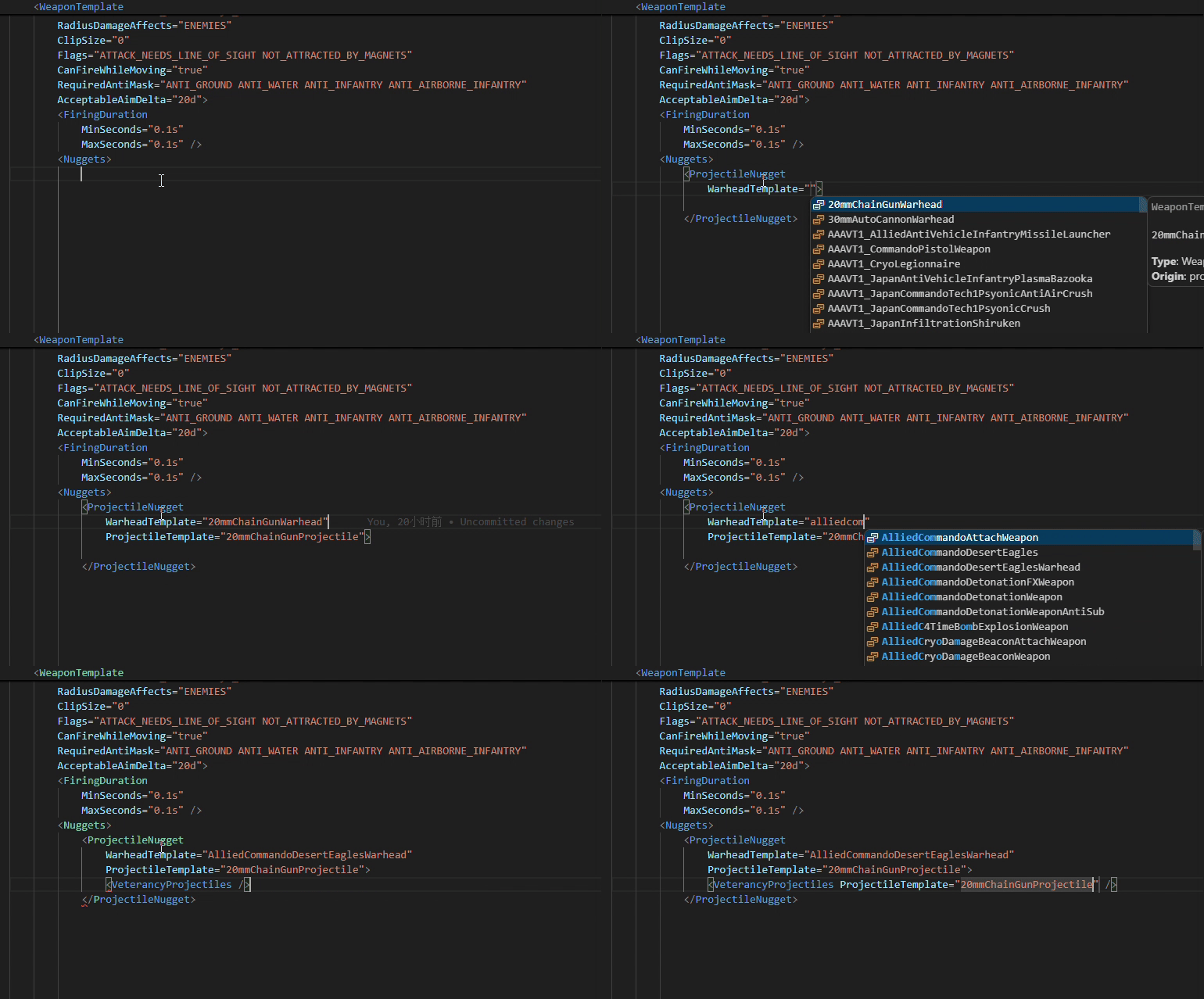
Reference-aware completion
Features
Intelligent Completion
Get context-aware completion based on the RA3 XML schema and project data.
- Elements and attributes based on the RA3 XSD
- Required attributes, types, documentation, and default values
- Asset references such as
Weapon,CommandSet, andinheritFrom - Enum values and flag lists such as
KindOfandSurfaces - Asset IDs in text-content elements such as
<CreateObject>and<RequiredUpgrade> DATA:,ART:, andAUDIO:paths- Automatic continuation when editing flag lists
Reference completion is type-aware, so an asset ID is only suggested where its asset type is valid.
Syntax Highlighting
RA3-specific constructs are highlighted on top of the built-in XML grammar.
Navigation & References
Navigate through a mod's asset graph directly from the editor.
- Go to Definition (Ctrl+Click) for asset references
- Find All References using semantic reference information
- Reference CodeLens showing how many times an asset is referenced
- Hover information for elements, attributes, references, and
$DEFINEs - Ctrl+Click navigation for
Includeandxi:include - Document outline for top-level assets and
$DEFINEs
Diagnostics
Catch common modding mistakes while you edit.
- XML syntax errors
- Unknown elements and attributes
- Missing or duplicate asset IDs
- Unresolved asset references
- References to the wrong asset type
- Undefined
$DEFINEs
Project Analysis
The extension can analyze the entire workspace rather than only the file currently open.
Find asset searches the index for an asset by Type:Id, by exact id, or by a partial id — typed directly into the picker, with results updating as you type. The result list shows each asset's type, origin (project / SDK / manifest), reference count and defining file; accepting a result jumps to its definition. When the same type:id exists in several places (for example a mod override of a vanilla asset), a second picker asks which definition to open.
Run:
RA3 Mod XML: Find asset (id or Type:Id)…
You can also select an id in the editor and use the context menu entry to search for it.
Find unreferenced assets lists project assets that are not referenced anywhere in the workspace, helping identify obsolete or accidentally unused definitions.
Run:
RA3 Mod XML: Find unreferenced assets…
You can also use the editor context menu to find unreferenced assets of the current asset type.
Vanilla SDK Integration
The extension can use asset definitions from the RA3 Mod SDK, allowing vanilla game assets to participate in completion, hover information, navigation, and diagnostics.
<Include type="reference"> manifests such as static.manifest, global.manifest, and audio.manifest (from the SDK's builtmods directory) are supported when the corresponding SDK data is available.
Large Mod Support
Workspace indexing runs in the background and uses persistent caches to avoid rebuilding everything on every VS Code launch.
The extension has been tested on Corona Mod, a large size RA3 mod:
- 32000+ assets
- 8000+ XML files
- 3000+ W3X files
- Full index: ~3 minutes
- Cached startup: ~40 seconds to validate cached data and rebuild the in-memory index
Measurements were taken on a mechanical hard drive. Actual performance depends on hardware and project structure.
Getting Started
- Install the extension from the VS Code Marketplace.
- Open your RA3 Mod project folder in VS Code.
- Make sure the workspace contains
Data/Mod.xml,Data/additionalmaps/mapmetadata_*.xml, or a*.babprojfile. - Set the RA3 Mod SDK path if necessary — the extension can auto-detect an installed SDK from the Windows registry, or you can pick the folder manually. Leaving it empty runs the extension in project-only mode.
- Open any
*.xmlfile and start editing.
The extension automatically detects RA3 Mod workspaces and starts indexing in the background. When the SDK is missing it shows a status-bar hint and offers to configure the path (once per session).
Configuration
| Setting | Default | Description |
|---|---|---|
ra3modxml.sdkPath |
(empty) | Path to the RA3 Mod SDK; empty disables vanilla SDK features (project-only mode) |
ra3modxml.indexSageXml |
true |
Index vanilla XML definitions from the SDK's SageXml directory |
ra3modxml.reportUnresolvedReferences |
warning |
Diagnostic level for unresolved references: warning, information, or none |
ra3modxml.diagnoseUnknownElements |
true |
Report unknown XML elements and attributes |
ra3modxml.definitionMode |
all |
Choose between project and vanilla definitions when navigating to references |
ra3modxml.additionalDataSearchPaths |
[] |
Additional directories searched for DATA: paths |
If the SDK is installed, the extension detects it from the registry and offers
it with one click; otherwise you can set ra3modxml.sdkPath manually or use
the RA3 Mod XML: Configure SDK path… command.
An empty ra3modxml.sdkPath is also the default value. Leaving the setting
untouched does not suppress the SDK setup hint; only explicitly setting it
to an empty string opts out of SDK features permanently.
Commands
RA3 Mod XML: Re-index workspaceRA3 Mod XML: Show index reportRA3 Mod XML: Clear caches and rebuildRA3 Mod XML: Configure SDK path…RA3 Mod XML: Show cache reportRA3 Mod XML: Find asset (id or Type:Id)…RA3 Mod XML: Find unreferenced assets…RA3 Mod XML: Find unreferenced assets of this typeRA3 Mod XML: Enable AI Agent access…RA3 Mod XML: Disable AI Agent accessRA3 Mod XML: Install Agent Skill…RA3 Mod XML: Uninstall Agent Skill…RA3 Mod XML: Uninstall AI Agent integration…RA3 Mod XML: Export AI Agent index snapshot
AI Agent Access
The extension can expose its semantic asset index to AI Agent clients through
a local, read-only MCP (Model Context Protocol) server. This is optional and
does not modify PATH or install global commands.
Run:
RA3 Mod XML: Enable AI Agent access…
The command:
- Exports a stable index snapshot for the active project.
- Creates a stable launcher under
~/.ra3modxml/. - Starts a local read-only query server while VS Code is running.
- Offers to:
- install the
ra3-mod-xmlAgent Skill to~/.agents/skills/(and optionally to Claude Code or project-local skill directories), - write the MCP client configuration for Claude Desktop or Cursor,
- copy a generic MCP configuration block.
- install the
The MCP server prefers the live in-memory index while the extension is
running and falls back to the last exported snapshot when VS Code is closed.
The exposed tools include asset lookup, incoming semantic references,
outgoing reference edges (get_asset_references: which assets an asset
uses, through which element/attribute, and where in the XML), active-file
checks, $DEFINE lookup, and Include source resolution.
get_asset_references follows inheritFrom ancestors and marks the
ancestor's entries with definedIn, so "this unit has no WeaponSetUpdate,
but the base unit it inherits from does" is answerable in a single call. It is
bounded by depth (default 1, max 3), targetTypes and maxEdges, and
reports truncation instead of silently dropping results.
Discovery is per project (~/.ra3modxml/endpoints/<project>.json), so several
VS Code windows can enable agent access at the same time without shadowing each
other, and a client can never be silently answered from a different project.
Each window also registers itself under ~/.ra3modxml/instances/, and a small
merged ~/.ra3modxml/index.json lists the live instances and their project
roots. A window that crashes is cleaned up by whichever instance starts next —
no workspace has to be reopened first.
No Node installation is required. The launcher runs the bundled server on
VS Code's own Electron binary (ELECTRON_RUN_AS_NODE=1) and only falls back to
node from PATH if that binary is missing. The launcher is rewritten on every
activation, so updating or moving VS Code does not break an existing MCP config.
The MCP server is plain JSON-RPC over stdio, so an agent can also query the
index without any MCP setup at all by piping a request into the launcher. A
matching CLI (cli.js, next to mcpServer.js in dist/agent/) answers from
the live index when VS Code is running and from the exported snapshot
otherwise; commands that need element context say so explicitly rather than
returning an empty result.
Installing and removing the integration
RA3 Mod XML: Install Agent Skill…works with or without an indexed project. The default target is the cross-agent~/.agents/skills/ra3-mod-xml/convention; Claude Code (~/.claude/skills/), project-local.agents/skills/and.claude/skills/, and any custom folder can be selected too.RA3 Mod XML: Uninstall Agent Skill…lists the recorded copies and removes only directories that still carry the extension's marker. A folder the user replaced or created by hand is never deleted.RA3 Mod XML: Disable AI Agent accessstops the live query server for the current workspace (project discovery files for this window are cleaned up). Installed skills and MCP client configurations are kept.RA3 Mod XML: Uninstall AI Agent integration…is the cleanup wizard. It can stop live access, remove installed Agent Skills, delete the MCP entries this extension wrote (from the recorded files and the conventional Claude Desktop / Cursor paths, leaving other servers untouched), and delete the stable launcher. Nothing is removed before a confirmation prompt.
After an extension upgrade, recorded Skill copies are rewritten automatically to the new version; directories without the extension's marker are left alone.
The first time an AI Agent feature becomes available (fresh install, or an upgrade from an older version), the extension offers to enable it after the first index. It never asks twice: choosing "Don't show again" — or simply ignoring the message — is remembered, and later upgrades stay silent.
See docs/ai-agent-integration-plan.md for the full design and progress.
Requirements
- Visual Studio Code
- A Red Alert 3 Mod SDK installation for full schema and vanilla asset support
- A RA3 Mod project containing
Data/Mod.xml,Data/additionalmaps/mapmetadata_*.xml, or a*.babprojfile
Development
npm install

npm run generate-model   # Generate the runtime schema model from the SDK XSD
npm test                 # Run unit tests
npm run build            # Build the extension
npm run package          # Create a .vsix package
Test fixtures are located in test/fixtures/minimod and cover scenarios including includes, duplicate IDs, same-name/different-type IDs, and manifest fallback.
Architecture
The extension is organized around a VS Code-independent parsing and indexing core:
src/
  extension.ts
  projectRoot.ts
  workspace.ts
  settings.ts

  language/
    xmlParser.ts
    context.ts
    typeContext.ts
    semanticTokens.ts

  model/
    schemaModel.ts
    schema-model.json   # Generated XSD model, bundled with the extension
    asset-types.json    # Generated AssetType hash table, bundled with the extension

  indexer/
    includeResolver.ts
    existence.ts
    manifestParser.ts
    fileScanner.ts
    refs.ts
    referenceIndex.ts
    xpointer.ts
    logicalTree.ts
    localScope.ts
    shallowScan.ts
    records.ts
    caches.ts
    diskCache.ts
    indexer.ts
    types.ts

  features/
    completion.ts
    hover.ts
    navigation.ts
    references.ts
    codeLens.ts
    unreferenced.ts
    diagnostics.ts
    semanticTokens.ts

syntaxes/
  ra3modxml.tmLanguage.json   # Injected domain grammar (keeps the built-in XML grammar)

tools/
  xsd-to-model.mjs            # Generates schema-model.json from the SDK XSD
  extract-asset-types.mjs     # Extracts AssetType hashes from OpenSAGE
References
- OpenSAGE
ManifestFile.cs— manifest format reference